

 Polski
Online dance tournament - how to organize it to delight the participants?
Updated October 1, 2026. The Karta Zgłoszeń organizer panel now operates in Contesty. Karta Zgłoszeń remains the participant panel. This guide has been refreshed to reflect the current registration process.
An online dance competition can be a standalone event, a qualifying stage, or an addition to an in-person competition. A clear rulebook, a simple registration process, consistent video requirements, and well-prepared judging and streaming are essential. The steps below will help you plan the event.
Online dance tournament - where to start?
You’re probably wondering what an online tournament may look like? You can’t imagine this kind of event without hundreds of dancers in the sports hall, thrilling competition and great emotions on the dance floor. Are we able to organize an online event that, at least partially, can arouse the emotions of viewers? How to deal with the limitations of the Internet? When you organize an online dancing tournament, start by thinking about a few basic things..
Who are you organizing an online competition for?
This is probably the most important question during the whole organization. In the current situation, the instructor doesn’t always spend time with his pupils. Some of them generally suspended their training. That’s why you should forward your invitation to the dancer’s parents (or dancers themselves), not to their trainers.
Obviously, one does not exclude the other, but I know from experience that in the case of online dance tournaments individual requests work better than those sent to a school or organization. Remember to include the approval for the individual applications in your regulations.
How to conduct qualifications for the dance competition?
The best option is to receive recordings of performances from participants. Organizers are often confused about what types of recordings they should allow - could it be a video from the previous tournament that took place on stage? If so, how many seasons back do we allow? Or, maybe the current recordings from home, training place or from somewhere outside will be better?
The first option will give you more applications. However, the current recordings will increase the competition, and the emotions during the competition will be greater.
If you will decide to accept current recording, reserve in the regulations that:
- the dancers record their performances on their own
- the recording has to be in one shot, without cuts
- the recordings have to be sent to the organizer in the selected category
You also need to decide if the candidates can dance to their own music or if you want to give them a specific track, just as on the classic tournament.
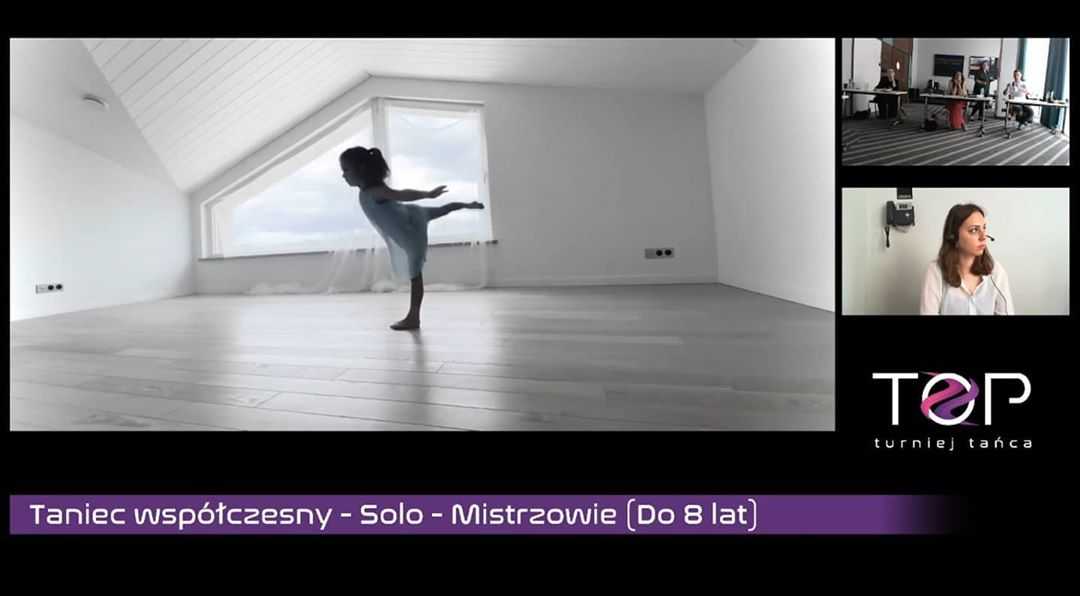
What recordings to accept during qualification?
How to record the performance? Where to send them? You’ll probably get these questions from candidates. That’s why you have to consider what technical requirements you want to set for recordings.
The quality of the recording
Of course, the recordings must be of good quality. However, it should be enough for the participants to use their smartphone. Today's phones have cameras of sufficient resolution to shoot a satisfactory video material.
Music
Some people skip this aspect, focusing only on the presentation, but poor sound quality spoils the overall perception of the performance. Therefore, suggest that dancers use musical equipment that produces clear sound on the recording. You can also advise inserting the original background music when editing the recording later, as long as the dancers have the appropriate technical skills.
Where to send the recordings?
There are a couple of options here. Consider what is best for you. I will show you what advantages and disadvantages each solution has and which method I prefer.
I vote against. You will quickly fill your inbox with files, which can often weigh up to 500 MB.
YouTube
Candidates can upload the recording to their YouTube account. All they need to do is sign in to their Gmail account. Viewing such a recording is simple. I recommend uploading the video with the status of unlisted, so only people with a direct link have access to it
Downloading YouTube videos to your computer is possible, but it can be troublesome. You can use the free app ClipGrab. However, keep in mind that the speed of such a download is fairly moderate.
Google Drive
You also need a Gmail account here. Remember to share such a file appropriately. It is important that the file is available to everyone with the link. The co-organizers often exchange recordings with each other, so giving basic permissions may not be enough.
The main advantage of this solution is the high download speed.
WeTransfer
This is the most-chosen option among candidates. The download is fast but has a time limit. With free accounts, you have to download the recording within 7 days of uploading it. After that time the file will be unavailable. Despite this limitation, downloading is very convenient and I recommend this solution.
Mediafire and other file hosting services
I do not recommend them. Either slow download speeds or other download restrictions.
How to submit an application for a dance tournament?
The organizer tools and forms previously available in Karta Zgłoszeń are now developed in Contesty. Participants still use a simple entry panel, while organizers receive all registration data in one place.
Contesty can collect dancer details, music files, and links to video recordings. It calculates entry fees, supports online payments, and sends confirmations and notifications by email or SMS.
Once registration closes, you can prepare starting lists, numbers, and materials for the jury. Organized entries reduce manual corrections and make it easier to pass recordings to the people responsible for qualification.
Ready to open registration? Go to the Contesty panel. If you are entering yourself or a group as a participant, use the Karta Zgłoszeń participant panel.
How to organize refereeing?
You can connect with judges remotely. However, in this case the reception of the performance by the judges will really depend on the quality of the Internet connection.
You can also send the recordings to the judges in advance so they can check them before the tournament. But it’s not the same…
At the moment, I believe that the safest solution is to gather the judges in one place and present the recordings on the projector.
Should we introduce a leader?
Nothing stands in the way of engaging the leader who will announce the performances. The rules remain the same, except that we speak "to ourselves" without direct contact with the audience. Of course, the host can respond to the comments of viewers watching the broadcast. Remember to provide the presenter with a USB-connected microphone to the computer.
How to broadcast?
What would a tournament be without an audience? To make it easier to track the competition in real-time, you should ensure the appropriate setting of the event. What to use? Of course, you can use the camera on your phone and share the image on Facebook or YouTube. But you can do it better 🙂 Use a free OBS app.
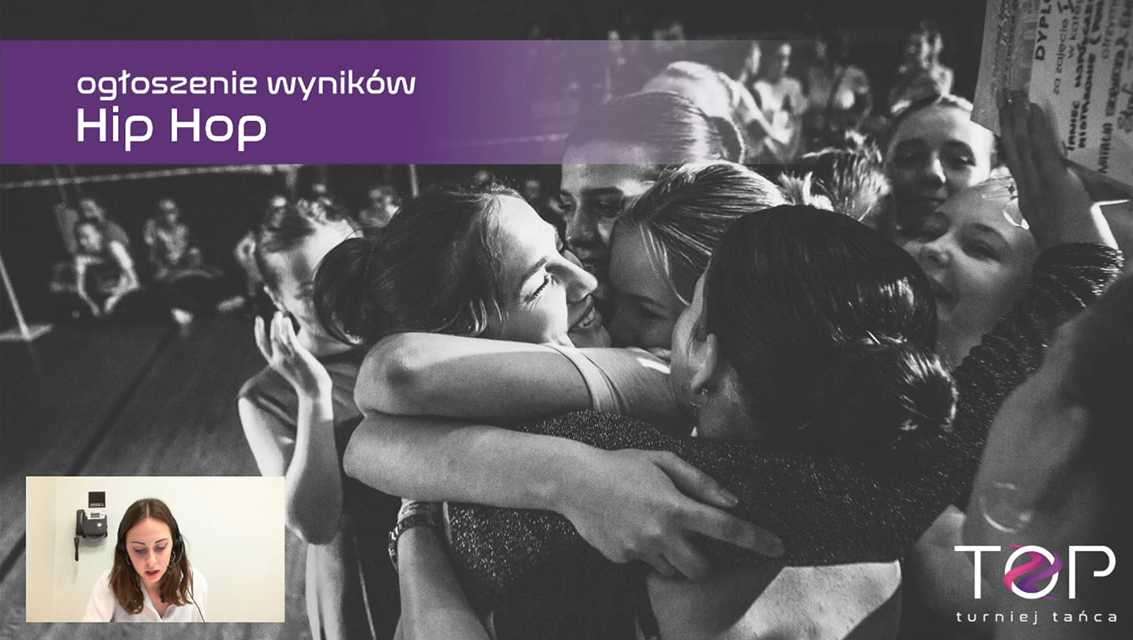
OBS makes it easier to control the transmission. It is a powerful tool:
- You will prepare separate scenes.
- You will be able to display the original recordings of the dancers on one screen, and the judges will have a separate preview with sound on the projector.
- In the corner, you will place a view from the camera directed at the judges.
- You will add the logo of the school, sponsors and partners.
- You will display animated boards suited to the situation during the tournament (e.g. referee briefing, technical break or announcement of results).
- You will connect an additional microphone to the computer to record announcements of the speaker, while muting the judges.
- You can play music during the breaks or a background music during the announcement of the results, which boosts the atmosphere 🙂
The possibilities are huge. You are only limited by your imagination.
If you are interested in using the OBS tool, let me know in the comment - I’m going to prepare material that will help you handle your first online tournament using this program.
What online platform to use?
You can stream through YouTube, Facebook, or another platform supported by your broadcasting software. Choose a service your audience knows, that lets you moderate comments, and that supports a private technical rehearsal.
No platform can guarantee that a broadcast containing music will not be restricted. Before the event, verify the licenses for every track and check the platform's current rules. Run a complete rehearsal using the same video, audio, and settings planned for the competition.
- prepare a backup account or communication channel for participants,
- assign someone to moderation and technical support,
- tell viewers where the current streaming link will be published.
What else to remember?
A broadcast needs a stable internet connection. Connect the computer by cable instead of Wi-Fi whenever possible. The measured upload speed should have a safe margin above the stream's configured bitrate.
Run a rehearsal at the venue, check the sound on a viewer's device, and prepare a backup connection. Mobile internet can be useful in an emergency, but its performance depends on coverage and network load.
Online dance tournament - it can be done!
In my experience, it’s possible to organize an online dance competition. And it can be emotional. Therefore, don't hesitate to try. Hope these few tips help you. Of course, these are not strict rules that you have to follow. Rather, it’s a collection of thoughts born of practice.
Do you have your own experience in organizing an online dance tournament? Do you want to ask about something? Let me know in the comment.